
Introduction
Honeywell thermostats help homeowners maintain comfortable indoor temperatures while managing heating and cooling schedules. However, seeing the word “Hold” on the display can be confusing, especially when the thermostat stops changing temperatures automatically. Understanding this setting helps you control your HVAC system, avoid unexpected temperature changes, and maintain a comfortable home throughout the year.
If you have ever wondered what does hold mean on honeywell thermostat, the answer is straightforward: the Hold function overrides the thermostat’s regular programmed schedule and maintains a selected temperature for a certain period or until you cancel it. Depending on your thermostat model, you may be able to choose Temporary Hold or Permanent Hold. Knowing how these options work allows you to adjust your indoor temperature without unnecessarily changing your entire heating and cooling schedule.
What Does the Hold Setting Mean on a Honeywell Thermostat?
The Hold setting on a Honeywell thermostat allows you to keep your home at a chosen temperature instead of following the programmed temperature changes. Normally, a programmable thermostat automatically adjusts the temperature according to the times and settings you have entered. When Hold is activated, the thermostat generally maintains your selected temperature rather than continuing with those scheduled changes.
For example, your thermostat might be programmed to lower the heating temperature at night to conserve energy. If you want a warmer bedroom while staying up late, you can adjust the setpoint and activate Hold, provided your model supports that option. The thermostat will maintain the selected temperature according to the Hold mode you choose.
This Honeywell thermostat feature is useful when your routine changes, you spend an unexpected day at home, or guests require a different indoor temperature. Instead of reprogramming the thermostat, you can temporarily override its normal schedule.
Temporary Hold vs. Permanent Hold
Honeywell programmable thermostats may offer Temporary Hold and Permanent Hold, although the names and operation vary by model. Understanding the difference helps you select the appropriate setting for your daily routine.
How Temporary Hold Works
Temporary Hold keeps the thermostat at your selected temperature for a limited period. On many programmable models, the override lasts until the next scheduled temperature change or until a specific time shown on the display.
Suppose your thermostat is programmed to reduce the heating temperature at 10 p.m., but you are entertaining guests and want the living room to remain warmer. You can increase the setpoint and select Temporary Hold if that option is available. Once the designated period ends, the thermostat can resume its regular schedule automatically.
Temporary Hold is useful for short-term changes because it lets you maintain comfort without permanently altering your programmed settings. It is often the most convenient choice when your daily plans change for only a few hours.
How Permanent Hold Works
Permanent Hold maintains your chosen temperature until you manually cancel the override or change the setting. Depending on the thermostat model, the screen may display “Permanent Hold” or simply “Hold.”
This option can be helpful when you are staying home for several days, following a different routine, or prefer a consistent temperature instead of automatic schedule changes. However, keeping a temperature fixed for extended periods may increase energy consumption if your chosen setting causes the furnace or air conditioner to run more frequently.
If your household schedule changes regularly, updating your programmed thermostat settings may be more practical than leaving Permanent Hold active indefinitely.
How to Set Hold on a Honeywell Thermostat
The process for activating Hold depends on whether you have a basic programmable thermostat, a touchscreen model, or a smart thermostat. On many models, you can begin by pressing the temperature adjustment buttons or using the touchscreen to select your preferred temperature.
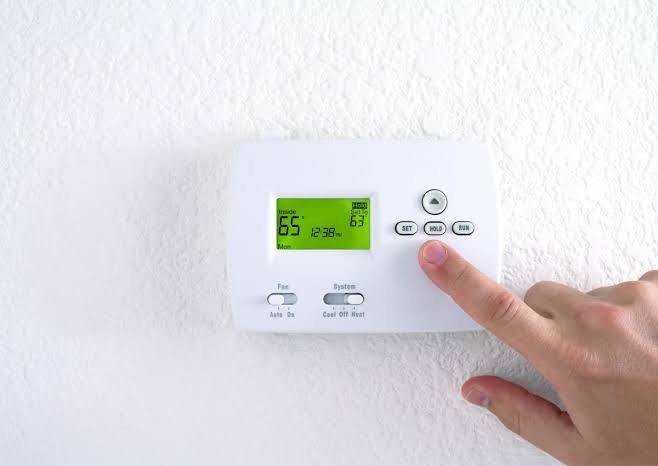
Next, press the Hold button or locate the Hold option in the menu. If your thermostat offers Temporary Hold and Permanent Hold, select the option that matches how long you want to maintain the temperature. Check the display to confirm that the selected setting is active.
Some newer Honeywell thermostats also support app-based controls, allowing you to adjust temperature settings remotely. However, the available functions depend on the specific model. Always consult your thermostat’s user manual for accurate instructions rather than assuming every Honeywell thermostat uses identical controls.
How to Turn Off Hold on a Honeywell Thermostat
If your thermostat remains at one temperature and no longer follows its programmed schedule, Hold may still be active. Fortunately, you can usually restore automatic temperature changes by canceling the override.
Look for an option such as “Cancel Hold,” “Run Schedule,” or a similar command on the display. Select it according to your model’s instructions. The thermostat should then return to its programmed schedule if scheduling is enabled.
If the temperature still does not change automatically, check the thermostat’s clock, day, heating or cooling mode, and programmed schedule. Incorrect times or improperly configured temperature settings can prevent the system from following the schedule as expected.
Does Using Hold Increase Energy Bills?
The Hold setting does not automatically increase energy costs. Its effect on energy efficiency depends on the selected temperature, the length of time the override remains active, outdoor weather, home insulation, and HVAC equipment performance.
For example, maintaining a moderate temperature while the house is unoccupied may reduce unnecessary heating or cooling. Conversely, holding a demanding temperature for an extended period can increase energy use if the system must operate more frequently to maintain it.
To manage HVAC energy consumption, use Temporary Hold for brief schedule changes, choose reasonable temperature settings, and return to your regular schedule when appropriate. If you repeatedly override the thermostat, consider adjusting its programmed schedule to better reflect your actual routine.
Tips for Managing Honeywell Thermostat Hold Settings Effectively
Knowing what does hold mean on honeywell thermostat can help you make better decisions about daily temperature control, especially when your household routine changes. To get the most from this feature, consider your comfort preferences, occupancy patterns, and energy-saving goals before choosing a Hold option.
If you leave home for several hours, review your programmed temperature schedule before activating Permanent Hold. Maintaining an unnecessarily high heating temperature in winter or a very low cooling temperature in summer may increase energy consumption. Temporary Hold can be a practical alternative when you need a short-term adjustment without changing your existing thermostat programming.
It is also important to check your thermostat display after changing settings. Confirm that the selected temperature is correct and that the thermostat is operating in the appropriate heating or cooling mode. If your model displays the time when Hold will end, use that information to understand when your regular schedule may resume.
For homeowners with compatible smart thermostats, mobile applications may provide additional scheduling and remote temperature-control options. These features can make it easier to adjust settings when plans change unexpectedly.
Finally, review your thermostat schedule periodically, particularly when seasonal weather changes or household routines shift. A well-planned schedule combined with appropriate Hold settings can support consistent indoor comfort and help you manage HVAC energy use throughout the year.
Common Honeywell Thermostat Hold Problems
Sometimes the Hold setting does not behave as expected. If the thermostat returns to its schedule earlier than you anticipated, check whether you selected Temporary Hold and whether its duration has ended. If you want to maintain one temperature longer, review the Hold options available on your model.
If the thermostat does not reach the selected temperature, confirm that the correct heating or cooling mode is active and that the setpoint is appropriate. The HVAC system may need time to bring the room to the desired temperature.
A blank screen or an unresponsive thermostat may indicate a battery, power supply, wiring, or equipment issue rather than a Hold setting problem. Check the user manual for basic troubleshooting guidance, and contact a qualified HVAC technician if the thermostat or heating and cooling system continues to malfunction. Avoid attempting electrical repairs without appropriate qualifications.
Conclusion
The Hold function gives Honeywell thermostat users greater control over indoor temperature settings when their normal routines change. Temporary Hold is suitable for short-term adjustments, while Permanent Hold maintains a chosen temperature until the override is canceled or changed. Understanding these options helps homeowners manage comfort, scheduling, and energy use more effectively. Since features differ across Honeywell models, consult the manufacturer’s instructions to use the correct controls and troubleshoot persistent problems.